최근에 Spring의 ApplicationContext 생명주기에 대해 정확하게 알아야 할 일이 있어서,
실제 코드 흐름을 따라가며 정리해보게 되었습니다.
그 과정에서 EnvironmentPostProcessor의 동작 시점과
Spring이 설정 파일을 언제 어떻게 로딩하는지,
커스텀 설정 로딩기를 어떻게 끼워 넣을 수 있는지를 확인했고,
이를 바탕으로 직접 **설정 파일 자동 로딩 라이브러리(config-importer)**도 만들게 되었습니다.
GitHub - ryu-qqq/config-importer
Contribute to ryu-qqq/config-importer development by creating an account on GitHub.
github.com
이 글은 그 과정을 정리한 내용입니다.
우선 간략하게 정리를 해보자면
SpringApplication.run()
 └─> prepareEnvironment()
     └─> configureEnvironment()
         └─> applyInitializers()
         └─> attach configuration property sources
         └─> listeners.environmentPrepared()
              └─> 🔥 EnvironmentPostProcessor 호출!
EnvironmentPostProcessor가 호출되는 시점
1. prepareEnvironment() 호출
SpringApplication.run() 내부에서는 가장 먼저 환경 설정 객체를 준비한다.
이게 우리가 평소 쓰는 @Value, @ConfigurationProperties로 접근하는 Environment다.
SpringApplication.run() 내부는 아래 와 같은데 이 코드의 가장 마지막 부분을 직역해보면 환경을 준비한다란 메서드가 보인다.
    public ConfigurableApplicationContext run(String... args) {
        Startup startup = SpringApplication.Startup.create();
        if (this.registerShutdownHook) {
            shutdownHook.enableShutdownHookAddition();
        }

        DefaultBootstrapContext bootstrapContext = this.createBootstrapContext();
        ConfigurableApplicationContext context = null;
        this.configureHeadlessProperty();
        SpringApplicationRunListeners listeners = this.getRunListeners(args);
        listeners.starting(bootstrapContext, this.mainApplicationClass);

        Throwable ex;
        try {
            ApplicationArguments applicationArguments = new DefaultApplicationArguments(args);
			//! 이부분 !
            ConfigurableEnvironment environment = this.prepareEnvironment(listeners, bootstrapContext, applicationArguments);
그리고 이 메서드를 보게되면 아래와 같다
스프링 프레임 워크의 코어부분인 Enviroment를 상속한 ConfigurableEnviroment를 만들어낸다.
private ConfigurableEnvironment prepareEnvironment(SpringApplicationRunListeners listeners, DefaultBootstrapContext bootstrapContext, ApplicationArguments applicationArguments) {
        ConfigurableEnvironment environment = this.getOrCreateEnvironment();
        this.configureEnvironment(environment, applicationArguments.getSourceArgs());
        ConfigurationPropertySources.attach(environment);
        listeners.environmentPrepared(bootstrapContext, environment);
        DefaultPropertiesPropertySource.moveToEnd(environment);
        Assert.state(!environment.containsProperty("spring.main.environment-prefix"), "Environment prefix cannot be set via properties.");
        this.bindToSpringApplication(environment);
        if (!this.isCustomEnvironment) {
            EnvironmentConverter environmentConverter = new EnvironmentConverter(this.getClassLoader());
            environment = environmentConverter.convertEnvironmentIfNecessary(environment, this.deduceEnvironmentClass());
        }

        ConfigurationPropertySources.attach(environment);
        return environment;
    }
여기의 내용을 이해하기 위해선 우선 스프링 프레임 워크의 core 부분인 env를 알아야하는데 이 부분에 대해 한번 알아보자
핵심 추상화 클래스는 PropertyResolver 와 Environment 이렇게 있다.
package org.springframework.core.env;

import org.springframework.lang.Nullable;

public interface PropertyResolver {
    boolean containsProperty(String key);

    @Nullable
    String getProperty(String key);

    String getProperty(String key, String defaultValue);

    @Nullable
    <T> T getProperty(String key, Class<T> targetType);

    <T> T getProperty(String key, Class<T> targetType, T defaultValue);

    String getRequiredProperty(String key) throws IllegalStateException;

    <T> T getRequiredProperty(String key, Class<T> targetType) throws IllegalStateException;

    String resolvePlaceholders(String text);

    String resolveRequiredPlaceholders(String text) throws IllegalArgumentException;
}
설정 값을 문자열 또는 객체 타입으로 읽어오는 최소 단위의 인터페이스이다.
package org.springframework.core.env;

public interface Environment extends PropertyResolver {
    String[] getActiveProfiles();

    String[] getDefaultProfiles();

    default boolean matchesProfiles(String... profileExpressions) {
        return this.acceptsProfiles(Profiles.of(profileExpressions));
    }

    /** @deprecated */
    @Deprecated
    boolean acceptsProfiles(String... profiles);

    boolean acceptsProfiles(Profiles profiles);
}
PropertyResolver를 확장한 인터페이스로, 여기에 프로파일 개념이 추가된다.
public interface ConfigurablePropertyResolver extends PropertyResolver {
    ConfigurableConversionService getConversionService();

    void setConversionService(ConfigurableConversionService conversionService);

    void setPlaceholderPrefix(String placeholderPrefix);

    void setPlaceholderSuffix(String placeholderSuffix);

    void setValueSeparator(@Nullable String valueSeparator);

    void setIgnoreUnresolvableNestedPlaceholders(boolean ignoreUnresolvableNestedPlaceholders);

    void setRequiredProperties(String... requiredProperties);

    void validateRequiredProperties() throws MissingRequiredPropertiesException;
}
설정 바인딩의 유연화로 설정 값을 객체로 바인딩하거나, 사용자 정의 변환 로직을 넣기 위해 존재한다.
public interface ConfigurableEnvironment extends Environment, ConfigurablePropertyResolver {
    void setActiveProfiles(String... profiles);

    void addActiveProfile(String profile);

    void setDefaultProfiles(String... profiles);

    MutablePropertySources getPropertySources();

    Map<String, Object> getSystemProperties();

    Map<String, Object> getSystemEnvironment();

    void merge(ConfigurableEnvironment parent);
}
Environment + ConfigurablePropertyResolver를 모두 포함하는 조작 가능한 환경을 위한 확장형 인터페이스다.
프로파일을 동적으로 등록 가능하고 PropertySources라는 실제 데이터가 있는곳에 접근이 가능하다.
public abstract class PropertySource<T> {
    protected final Log logger;
    protected final String name;
    protected final T source;

    public PropertySource(String name, T source) {
        this.logger = LogFactory.getLog(this.getClass());
        Assert.hasText(name, "Property source name must contain at least one character");
        Assert.notNull(source, "Property source must not be null");
        this.name = name;
        this.source = source;
    }

    ..
public interface PropertySources extends Iterable<PropertySource<?>> {
    default Stream<PropertySource<?>> stream() {
        return StreamSupport.stream(this.spliterator(), false);
    }

    boolean contains(String name);

    @Nullable
    PropertySource<?> get(String name);
}
설정 값의 실제 저장소 역할을 하는 객체들이다.
다양한 구현체가 있다.
이정도로 핵심 추상화 객체를 마무리하고 궁금한 부분이 있다면 직접 해당 패키지를 살펴보면 좋을것 같다.
아래는 간략하게 env쪽 패키지를 다이어그램으로 표시해봤다.
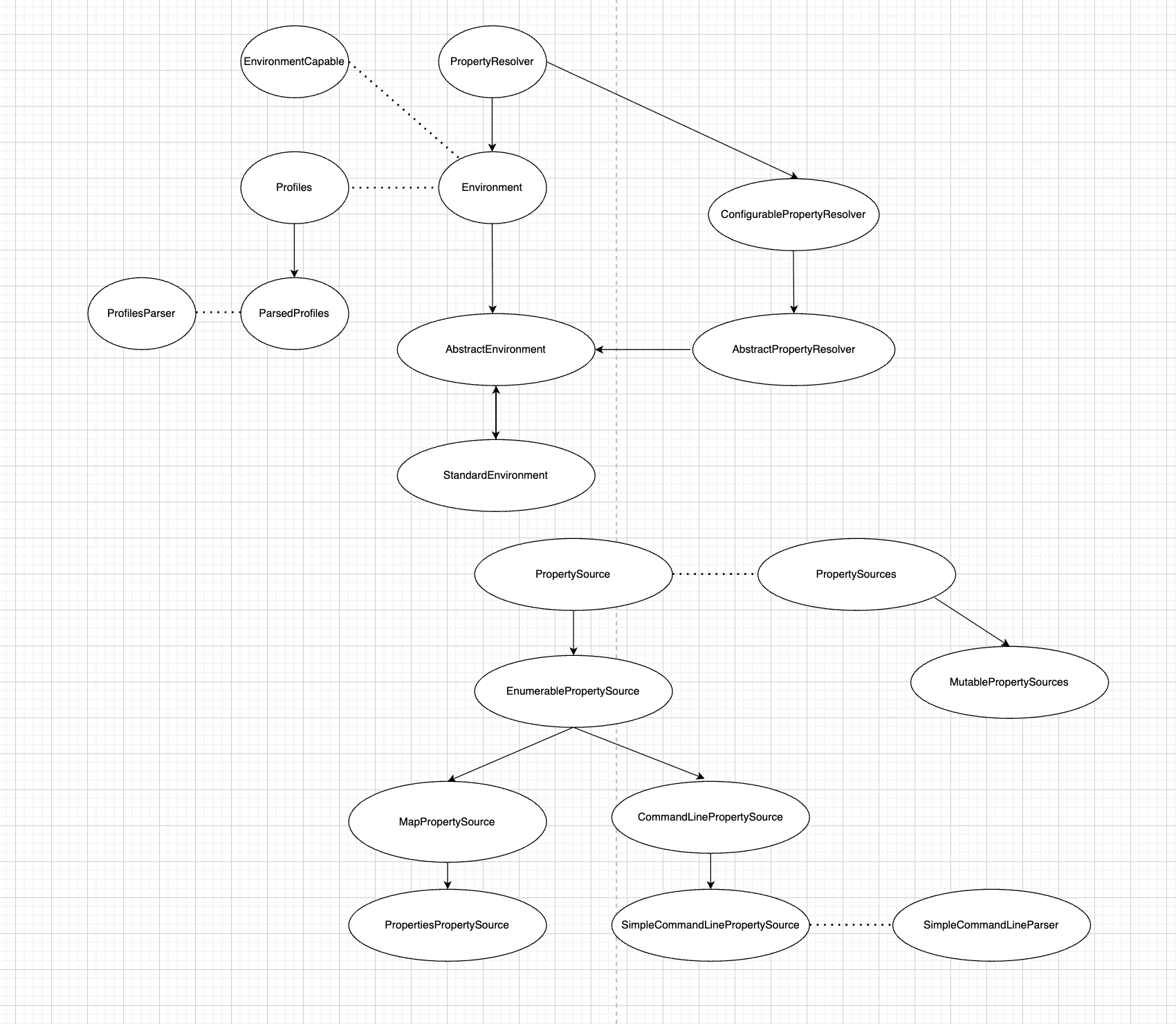
이번 글에서는 환경 추상화 객체들에 집중했다면,
다음 글에서는 실제로 SpringApplication이 어떻게 Environment를 생성하고 초기화하는지,
그리고 EnvironmentPostProcessor가 어떻게 개입하여 설정 파일을 읽어들이는지 살펴볼 예정이다.
'Spring' 카테고리의 다른 글
| SpringApplication.run() 이후의 동작을 따라가 보기 – 설정 파일은 언제, 어떻게 로딩될까? - 2 (1) | 2025.07.03 |
|---|